Yesterday morning I did a keynote presentation for our High School Pro-D day that I called: ’It’s not about the Technology -(and it’s not a secret)‘. I’ll share this online after I get back from holidays.
The night before the presentation I sat and looked at what I had prepared and hated it. I wrote on Twitter: “I’m just over 10hrs away from presenting & want to totally revamp my presentation. Not a great feeling.” ~ It really wasn’t.
I appreciated the support and advice given to me, especially from Lisa Thumann, Jen Wagner and Shelly Terrell who all offered to take a look at what I’d done. The problem was that I didn’t like my presentation enough to send it to them… then I fell asleep. I woke up at 3am and realized that I was stuck with what I had, I just didn’t have enough time to change my presentation with just over 3hrs before I had to catch a cab to the train (Qing Gui) station.
I had to deal with the slides I already had. My presentation was broken into different sections that each had the item that is (not a secret) in brackets. I took all those titles, wrote them on post-it notes and juggled them around.
I broke up my presentation and, like Lego, reassembled the pieces into something different. I moved from a scattered bunch of ideas into a story. Suddenly I had a presentation I was happy with.
I slept on the train and when I woke up I ended up in a wonderful conversation with a man who spoke to me in Chinese and continually asked questions that I didn’t understand, and then talked about me to those around us. My broken and very limited Chinese did not serve me well.
Setting up for my 8am presentation we couldn’t get my laptop sound to go through the auditorium speakers without horrible feedback. Small speakers were brought in, (I almost brought my own, but I was at this auditorium just 2 weeks ago and knew that it was well equipped). With the small speakers and addition of my mic, all was good… or so I thought!
I tried to go to the primarypad.com/ pad (an etherpad clone) that I had set up with all my links, and as a backchannel for the session, but I couldn’t get wireless. It seems the new campus wireless doesn’t reach the auditorium other than a few rows in the back.
I started my presentation and within 30 seconds the power went out. I picked up my laptop and said to the 100+ audience members, “Ok, everybody gather around here.”
I started a conversation about ‘What tech tool can’t you live without, that didn’t exist 5 years ago… and by the time people had discussed this with their neighbours and we started sharing as a group the power turned on… “POP” … that would be the sound of the ceiling mounted LCD light bulb burning out.
That’s when I asked a new question: “How many of you have had the experience before of having a lesson planning epiphany… suddenly you are up late at night planning… you head into the school before class starts in the morning and when you get to the photocopier… it’s BROKEN!“ ~Most teachers raised their hands.
“So, keep your hands up if you said something like, ‘That’s it, I’m never using the photocopier again?’“ ~All hands went down.
Sometimes ‘technology’, be it a photocopier, a presentation, or even a pen doesn’t work.
Eventually we got going. I didn’t get to more than 1/2 of my slides, but found a great place to stop so that it felt like my presentation had an ending. Judging from the standing-room only in my break-out session afterwards, what I did was well received.
~~~
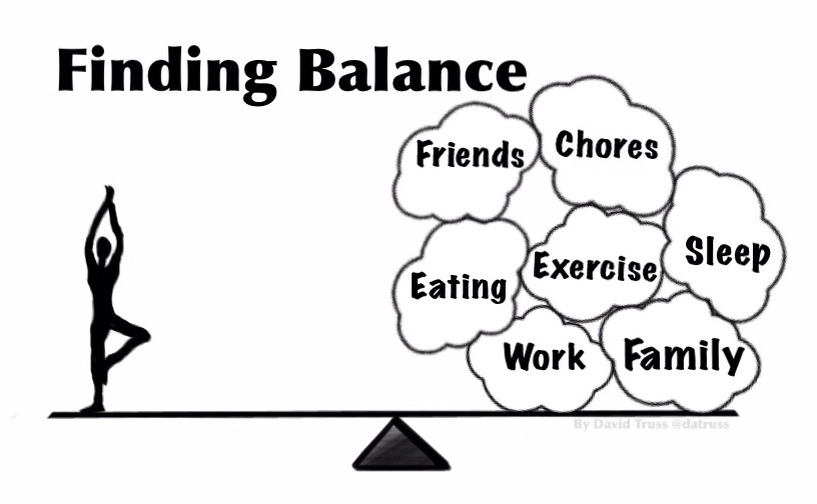
There were a lot of reasons to roll my eyes and complain. There were a lot reasons to let frustration prevail… and there was an opportunity for me to model for everyone that it really isn’t about the technology.
What the day was about was professionals getting together and learning, and when it comes to learning, the hardest thing to ‘fix’ is broken attitudes!
Kudus to the staff, they were patient with me, asked a lot of great questions, and eager to learn new things. Reflecting now, the only thing that feels broken is the title of this post.
Sue Waters, a friend who has always stepped up and helped me out with just about every request I have ever made to my PLN, sent me an email a couple nights ago. In it she said:
I’ve been asked by some 4th year preservice students to put together a video on the value of blogging. They had wanted me to answer the questions but I decided that it would be considerably better to get videos from people around the World sharing their thoughts — that way we get more ideas.
If you are able to video yourself answering some or all of these questions that would be excellent.
What are some of the benefits of blogging?
How have you used blogging with your students and how has it helped them?
How do the students feel about blogging?
What are some tips for educators new to blogging? (with using them with their students)
This was the first time that I used Camtasia, compliments of Techsmith and Alan November teaming up and providing it to all of the BLC09 presenters. It is a great tool that is easy to use with all the features that a Mac lover like myself would expect. The transitions are a little choppy, but I basically sliced and diced up a Powerpoint presentation, ‘This my blog has taught me“, and then recorded my screen as I spoke. The whole process took just over a couple hours and it was a lot of fun to be doing a project like this again, after creating my POD’s are Coming presentation this summer.
I noticed as I watched this and listened to myself that the idea of a blog being a ‘learning space’ came up both when talking about my own blog and when I spoke of the classroom and what technology could do to expand the classroom space. I think that our idea of where learning happens has made a fundamental shift from book knowledge of the last century to anywhere/anytime information access of today. It is exciting to see classrooms make this shift too. Last night I commented on a blog post by a student of Clarence Fisher’s, in Snow Lake Manitoba, Canada. In a way you could say that I visited Clarance’s class. We live in an amazingly connected world and I love that sharing and learning has become so global.
I’d love to see others share their blogging story, and if you do, share them with me and Sue too!
This has been floating around in my head for a while, but Scott McLeod’s ‘Banning Student Computers’ slide and Sonya’s ‘The New Teacher’ inspired me to finally express it visually.
The last time he was in town, Alan November spoke of just how silly it would be to ban pencils like we do cell phones because someone passed a nasty note… It isn’t really about the tools now, is it?
Click the image below to see this full sized on ToonDoo or here for flickr.
SonyaWoloshen is a new teacher this year. She is a job-sharing French Immersion teacher at our school 2 days a week, and at another Middle School the other 3 days.
Sonya did a short pro-d session this afternoon with some of our teachers. Her session title: “I took the red pill”.
She ran through using Powerpoint/Keynote, Screencasts, and podcasts. But time and again her emphasis was not on the technology or the tools, but on the meaningful engagement of students. It was about students learning transferable skills and teaching each other as they learned.
Sonya also highlighted how she and her students use ipods/iTouch/mp3s in her class. Here is her ipod-touch-proposal she made to our Director of IT. She also wrote an article on ipods for CueBC.
For this presentation, she showed the first video here to start things off. Here are a few quotable quotes from her session:
“In 5 years I want to run a paperless class.”
“As a new teacher, I don’t think of it as a issue when one student doesn’t have the technology available. That’s not a problem, just something to work around.”
“I push technology in every project I do, but of course I make it available to my students to do a poster or paper presentation if they want to or if they don’t have the technology available to them at home.”
“What if you don’t know everything? Students love knowing more than you and teaching you.”
Sonya is a digital teacher. She gets that it isn’t about the technology but about engaging students in meaningful ways. She is brand new and yet ahead of the curve. What I really liked about this presentation was that she didn’t just ’sell’ technology, she mentioned the challenges too… from her iTouch being stolen (it was returned) to technical issues causing her to load programs on 25 iTouch/ipods only to have to reload 15 of them the next day when students should have been using them. These are not deal-breakers, simply challenges to overcome.
As she talked I thought about how many teachers get fed up with technology and give up. Imagine a teacher going to a photocopier and it doesn’t work, so they say, “That’s it, I’m never using that again!” Or a person getting behind the steering wheel of a car for the first time, struggling, and then never driving again.
What makes Sonya a Digital Teacher is that she sees the value that tech tools offer and she overcomes the challenges they present (fearlessly). Sonya understands the potential of POD’s, and she is starting her career at a point that I had to evolve to:
I’ve seen a real shift in my own thinking recently. Forget whining about access, disregard the slow speed of change, get over the obstacles! Go after meaningful results. Engage and empower students. Be a leader and a role model. Opportunities, Access & Obstacles
It is exciting and inspiring to see a new teacher, confidently and fearlessly sharing her learning with a group of teachers, who in turn are equally interested in, and engaging with, new teaching and learning practices. Kids today are part of a YouTube Generation and they need digital teachers to help guide and inspire them to be lifelong learners, equiped for a future that I myself cannot truly imagine.
I wish people would stop trying to compare old ways with new ways and started asking, “What can we do with this amazing new tool?” or “How can I use this to engage learners?” or better yet, “How can this empower students to pursue their own learning?”
And we had better start doing this soon!
Why?
PODs. We are about 5 years away from most of our students bringing PODs to school, Personally Owned Devices. I’m talking about pervasive access to laptops and iPhone-like devices in our schools. Every kid coming to school with more capability in their pockets and hands than most teachers have on their desk right now.
So now a big question comes to mind. At the pace we are going now… Will we be ready to utilize these amazing tools that will be brought into our classrooms?
I say no!
So, new questions arise: What do we need to do to be ready? What needs to change? How do we maximize what we can do now? Who makes this happen?
No it’s not about the technology… you don’t need technology to promote inquiry and a love of learning in students. It is not about preparing our students for the future… it is about preparing our teachers for the future. It is about asking ourselves the right questions and promoting a spirit of inquiry with our teachers. And finally, it is about leadership.
But traditional leadership alone won’t work. It is YOUR leadership that we need. Do not go quietly into your classroom. Do not go quietly into your schools. Do not wait for PODs to arrive. You are the one that can make a difference… ask yourself, “How can I prepare my colleagues for the future of education?”
I’ve asked a lot of questions, and I’ll provide an answer to one of them now:
It is finally done! I had planned on first showing my video version of A Brave New World-Wide-Web Slideshow in Boston at BLC08. I did it on Mac Powerpoint and it did not convert easily to video… it wouldn’t even convert to PC Powerpoint without the timing messing up! I spent hours on this! I ended up showing the powerpoint version and had a number of people ask me for the video version. Well, this weekend I converted it to pc Powerpoint, then with some $45 software, it is FINALLY done! This is a personally ’story’ that I tell, but I think it can speak to others and I hope it speaks to you! Be brave! Do not go quietly into your classroom!
I plan to offer a downloadable version that is of a better quality here, but I’m off to spend some family time on the beach while the weather is still good. It is coming soon!
A year ago I went to see my friends Dave Sands and Brian Kuhn presenting to parents that were part of a 1-1 (one laptop per child) pilot program at a Middle School. Little did I know that I’d be moved to that same school as the Vice Principal in February, and that I’d be co-presenting with Brian, to the parents in the program, one year later.
Brian did a great job preparing the presentation and with similar philosophies it was very easy to contribute meaningfully to what he had prepared.
The key messages we brought up sounded eerily like my 3rd presentation at BLC08 in Boston, but I’ll have more on that later.
As we were giving the presentation it occurred to me that 1-to-1 is about exposing teachers (and parents) to possibilities as much as it is about doing the same for students. The fact is that not long from now we won’t need 1-1 classrooms because students will be bringing their own computers/movie cameras/mp3 players/web browsers/instant messengers/calculators/agendas to school with them:
I predict that in about 5 short years almost every Middle School student will own an iPhone or its’ equivalent, and they will be connecting to our wireless network via bluetooth for absolutely free. Students will be ready, willing and able to use these tools in our classroom… will teachers be ready enough to maximize the opportunities and learning experiences these tools (coming to our classrooms for free) will provide?
I’ve been hearing a message from a lot from technology-using teachers recently… “I can’t go back”! Teachers are beginning to see that technology in the classroom is more of a necessity than an opportunity.
One-to-one is not a program that can be sustained across an entire district, it would be too expensive. However this program is ideal to pilot with willing teachers… teachers who recognize that the classroom of the future will give every learner access to tools that would have costed a fortune just a few years ago… tools that some students are already bringing to our classrooms… tools that students will bring to our classrooms of the not-so-distant-future in abundance!
This is the last post that I have to move and so I thought I would put my reflection first.
I actually posted this after I went back to the beginning of my blog and started the reposting process. There is only one other time that I interjected a new post during this reflect and repost process, and I did that because the issue was time sensitive. That said, many reflections have been posts within posts with new ideas developed and shared.
So here now is my final post reflection in this format… I have now officially moved my blog completely over to this new feed.
- – - – -
Audience does matter… and so does authority. Even in some of these reflections I have seen a shift in my tone on this blog. To be honest, it has been a healthy shift. I still rant, as the first link above demonstrates, but I think I have found a much more positive spin on things thanks to my change in position as well as the choice to put this blog at an address with my name on it.
Every e-mail I send out has the Zoroastrian quote, “Think Good Thoughts, Say Good Words, Do Good Deeds”, and in fact, so do most of my online profiles. Yet, my frustration with the slow process of tearing down archaic institutional walls that hinder the use of transformational technologies in schools has left me frustrated, if not outright bitter, at times. But who are my audience? What does a somewhat negative tone tell them about blogging or working with technology?
As I say below:
We need to be empowered learners if we want to lead other learners.
Anger and frustration may spur the desire to learn, but these ‘hot’ emotions do not encourage a positive learning environment, they do not enhance a learning experience, they do not empower us to be leaders.
You’ll still see me rant, and I’ll still show my frustration at times, but I hope to keep the tone positive and I hope to keep my very own personal learning environment, my learning hub, a place where my thoughts, words and deeds are inherently good.
Thanks to inspiration by Alec, I ended up staying up well past my bedtime (again) and writing a Forum Post in an online Dialogue for our Building Leadership Capacity group. This is a group of teachers interested in Leadership within the District, they meet for 3 session and the discussion forum is designed to keep the conversation going between sessions, (it is just getting started). It is interesting being one of the facilitators after being a teacher-participant for a few years. Regular readers will see that my comments are tempered with a slightly different tone as I figure out my voice as an Administrator. We tell students, “Audience Matters!” But now I am experiencing that first-hand. Here is my discussion forum post:
- – - – - – - – - – - – - – - – - – - -
Here is an interesting video.Schools as institutions are so slow to change. I think if we really want to be leaders we must prepare our students with the tools of today and tomorrow, not yesterday!
From Alec Couros’ Letting Go “…we’ve reached the point in our (disparate) cultural adaptation to computing and communication technology that the younger technical generations are so empowered they are impatient and ready to jettison institutions most of the rest of us tend to think of as essential, central, even immortal. They are ready to dump our schools.”
Harsh words, but as our own district ramps up its’ online learning and districts like West Vancouver do the same, we must ask ourselves how best to meet the needs of our students in schools? On the topic of technology use, I created this slideshow to show to SFU Student Teachers at a pro-d session earlier this year: Brave New World-Wide-Web. Towards the end, it highlights some of the tools that students used to empower their own learning.
And that brings us back to the idea of leadership. We need to be empowered learners if we want to lead other learners. We need to create an environment that fosters doing new things in new ways, like many cutting edge organizations do. However, this isn’t a complaint about what we need and don’t have. I read a lot of blogs by teachers across the globe. Here in Canada, and in the US, there are countless districts where not every classroom has a computer, or where draconian online censorship by the district limits what a teacher can do. Compared to most school districts, we are actually leaders on the technology integration curve, especially with respect to our ideology of openness and what we have with the My43 portal.
So as leaders, how do we harness this advantage? If we want to build capacityand empower the leaders in our district, what is it that needs to happen to foster a culture that thrives on challenge
and change? What do we need to do to nurture our own learning? How can WE become educational leaders that prepare our students for an age of prolific technological advancement?
Last Friday I was leaving the school and I popped into my VP’s office. Among other things, Anthony and I often talk about technology in the classroom. One thing led to another and I showed him the YouTube video that was the subject of my last post: iPhone tutorial from a two-year-old. It was shortly after this, while I was saying something, that Anthony interrupted me:
“You can’t go back now, can you?” “What?” “You could never be able to go back to teaching without technology, could you? “No.”
Driving home after our conversation it occurred to me what a transformation my teaching has gone through in the past couple years. Could I go back to a classroom and teach void of blogs, wikis, & online networks? Well, of course I could, but I just wouldn’t want to!
Not only do I never want to go back, but I have become an evangelist.
However I’ve noticed a bit of a backlash among teachers. Comments like “We can do that without technology” miss the point about what students have the potential to do. “Every time I get them in the computer room all they do is Facebook” recognizes that technology is a tool, not an answer, but comments such as these are used as excuses rather than challenges.
In the past few weeks I’ve heard more than one teacher say, “What is Facebook”, and “What is a wiki?”. This I can handle. But then I hear about how technology is evil; about what a distraction it is. Well here is a little news flash… IT ISN’T GOING ANYWHERE!
There are times I just want to put my head down, improve what I am doing as a teacher, and forget that there is ‘work to be done’. I can’t. Not only can’t I return to life in Plato’s cave, but I am also compelled to ’share the true light’. I now realize that at times I am destined to be seen as ‘blinded’, such will be the lot in life for many of us.
Can you go back now?
Originally posted: December 17th, 2007
Reflection upon re-reading and re-posting:
I’ll let the comments on the original post speak for me.
No David, we can’t go back. We have come too far along the road and know too much about what is out there to go back. We are willing to take the good with the bad and suffer some of the things that come along with knowing – like sleepless nights, frustration of things not working, having to re-explain to students, losing things in cyberspace, etc. We are willing to go through these because we have experienced the joy and fun and exhilaration and…. when something happens. It’s so constructivist that we cannot understand how others don’t see how great it could be. But, just like Darwin argued for changes in education over a 100 years ago with little change, we need to change much more than just the tools we use. We need to change the way people view learning. Keep up it up! We’ll get there!
your post is very inspiring, and for me in many dimensions. In the first glance it seems to be the expression of skeptical view of all ongoing development. The sort of skepticism we may all know. (Won’t Work, etc.) But this vibes in me in sustainability. It seems to me now that this should be a good point growing and going in concrete. Yes – i also would answer, that i couldn’t go back teaching my university students being creatively – expressive… poetaster’s group host. Getting organized – … And its is the effect of the new technology as an crystallisation point of all those affords and their solutions. But – and this has been deeply grown for me now: There is a lot of work to transport our learning experiences – observations – effects – because they are complex to observe and more than than complex to transport – especially to those who want to access it theoretically.
Maybe – and this would be my answer: “I cannot go back – because I’ve seen the glance in the eyes of the students. I cannot go back, because they have implemented my top level aim: They changed the verbing from :”I am podcaster at University-Koblence” to “I have to do something for my podcast”) This are the points you cannot explain to somebody who hasn’t got infected .
Best greetings from the icy-cold Germany – and forgive the typos – my English @ school has been a long time ago
Constructivist indeed! That’s the challenge for those looking from the outside trying to understand.
Andreas,
Thank you for looking beyond your first glance, and seeing beyond an expression of the skeptical view. My intent was NOT to say, “Oh no, I can’t go back!”, but rather to identify that what lies ahead is much too exciting to go back again… and I can tell that you saw that!
The transformation that you see in your students is an excellent example of why so many of us are, as you say, ‘infected’ – (a brilliant choice of words that only arises from a second language speaker:-)
Your students are fortunate to have you guide them. I am sorry that I do not speak German and the English translation of your Podcasting for Learning does not do justice to your writing, as your comment demonstrates.
Thank you both for your comments!
Dave.
David Truss on Thursday, 20 December 2007, 18:40 CET
David,
I love this post! I can’t go back and I don’t think kids can go back either–and we all need to remember that.
It is discouraging sometimes to feel like the one shouting in the wilderness. I’m eager for the day when many of the research studies going on will show the value of what we know/feel to be true!
Thanks for the post!
Carolyn Foote on Tuesday, 08 January 2008, 20:58 CET
I’ve bounced some digital immigrant/native ideas around a fewtimes. Now I have one more thing to add.
When I was young my sister had dolls that spoke. This was so amazing! You pulled a string in the doll’s neck and as it recoiled the doll said, “Hi Ma-ma” or some other short phrase. Later the dolls would say a series of phrases, changing with each pull-of-the-string. Now my daughters have My e-Pets and Webkinz. Next comes this video:
It seems that the ‘Immigrant/Native’ argument is moot. I called the digital range in competency/capability of students a spectrum, not a dichotomy, (I think the correct word should have been continuum -note the reflection/comments on the post to see why I now think ’spectrum’ is better than ‘continuum’). The fact is students can’t be lumped into general categories such as this. George Siemens summarizes this point better than I can, so read his post, and I’ll move on to the point of this post.
There is an issue of ‘digital exposure’ that many (but not all) of today’s kids have that simply wasn’t available when we were young. Despite my new distaste for the ‘digital native’ catch phrase, I am back to liking my Batman/Borg quote:
“I come from the Batman era, adding items to my utility belt while students today are the Borg from Star Trek, assimilating technology into their lives.”
My daughters interact with their toys in ways that I never could. In the same vein, two year old Paige from the above video will expect her toys to interact with her, to provide her with choices that I never had. Does it not follow that she will expect the same interaction and engagement in school?
Basically this is about ‘exposure to’ and ‘integration with’ digital technology at a young age as opposed to ‘adaptation to’ digital technology later on in life.
When Paige is 9, she will have peers that instant meesage each other on their PDA’s… they will be more likely to communicate online at a younger age… they will be more likely to connect to like-minded social groups digitally. They will be continually exposed to ‘new technology’ that they won’t ever remember living without. (Technology and tools that we name, and they participate with.)
Meanwhile, I will continue promoting the value of integrating technology into the classroom to teachers who have “enough on their plate already”. I will offer out some ‘delicious‘ tools for their utility belts… while Paige plays with an iPhone and learns to connect to the world around her in ways many of us are now learning about… learning side-by-side with a two year old.
Originally posted: December 11th, 2007
Reflection upon re-reading and re-posting:
In any given Grade 8 class, I have had students at a Grade 4 to Grade 10 competency in Math. The gap has been equally as large in writing and reading skills… and it follows that I will have similar competency level issues with students’ abilities in connecting and communicating digitally.
Digital exposure will lead to greater digital competency, but that competency can be very focused or limited in scope. For some, (like the students I highlighted in the reflection on a recent post), digital exposure has sparked an interest in understanding how computers, technology, and/or the internet work. These students will be digitally competent in most, if not all, areas. For others, competency will be very limited and demonstrated, for example, in the ability to play games, even ones that they have never played before, at a competent level very quickly. Yet others will be able to text messages without needing to look at their phone, and yet find themselves lost when trying to embed a video onto a blog.
We’ll have both Batman-like and Borg-like students in our classes.
- – - – -
The Digital Immigrant/Digital Native dichotomy is untenable.
Gaps in Digital Exposure and Digital Competence will be no different than the gaps we see in basic skills or content areas when we enter a classroom.
- - - - - - - - - - - - - - - - -
Two Wolves Which wolf will you feed? A Remembrance Day Post
- - - - - - - - - - - - - - - - -
My blog is my PhD I have given myself a Blogtorate of Philosophy.
- - - - - - - - - - - - - - - - -
Bubble Wrap What we are doing is creating a facade of security, nothing more than an illusion of bubble wrap. - - - - - - - - - - - - - - - - -
Who are the People in Your Neighbourhood? My (digital) neighbourhood spans the globe. - - - - - - - - - - - - - - - - -
Kelly Christopherson on Monday, 17 December 2007, 23:18 CET